Showing posts with label apple. Show all posts

Thursday, October 31, 2013

More iOS7 Glitches

It has been reported that almost 70% of iPhone and iPad users have upgraded to iOS7 which is a big success for Apple, however all is not rosy for Apple because several glitches are being reported by users everywhere. While Apple is responding to these reported problems there are some things you can do if you experiencing any of the following problems.


Messages Won't Send

Problem: When sending a message, the status bat gets stuck and the message does not go through.

Solution:
  1. Go to "settings---messages".
  2. Switch the iMessage slider off.
  3. Go to "settings---general".
  4. Tap "reset network settings".
  5. When the device powers up again, go back to "settings---messages" and the iMessage slider on.
Battery Drain

Problem: With increased power comes increased power usage.

Solution:
  1. Turn off the 3-D parallax effect by going to "settings---general---accessibility---reduced motion".
  2. Disable background app refresh in the "settings---general" menu.
Motion Sickness (yes this is really a reported problem)

Problem: Some users have reported getting motion sickness from the new operating system's display.

Solution:
  1. Go to settings---general---accessibility and
  2. Tap "reduce motion".
  3. Increase the contrast, and
  4. Reduce the screen brightness.
Apple will probably continue rolling out updates and patches for these and other problems but in the meantime if you are experiencing the above issues these adjustments should help.

Thursday, October 24, 2013

More Security Problems for iOS 7

Things have not been going so good for Apple these past couple of months, first the iPhone 5C may be their first true flop in years and iOS7 is making users angry and confused and the new operating system seems to be plagued with security problems. For example soon after iOS 7 came out, a pair of holes in the lockscreen were outed and then quickly fixed in iOS 7.0.2.
 
 
However it now turns out that Apple didn't fix future problems of this sort proactively, because the just-announced iOS 7.0.3 closes three more locked-phone holes. Apple rarely releases updates, or what are really patches this quickly.
The three bugs this time deal with similar problems to those patched in 7.0.2:
  1. Another flaw in the emergency call feature, where hitting the call button at a carefully-planned moment lets you call any number, not just 911 or your local equivalent.
  2. A passcode lockout bypass, so that crackers can continue trying passcodes even after the phone decides they've had too many goes and locks them out.
  3. Access to the Contacts pane even when the phone is locked
If you care about security, you may as well make sure you grab this update as soon as you can, if your phone hasn't done it for you already.

Monday, October 14, 2013

Improving Apple's Battery Life

With your recent update to iOS7 on your iPhone or iPad you probably have seen a degrade in the performance of your battery. Well the good news is that it is not just you - but almost everyone who took the time to perform the update. There are a couple of adjustments you can make if you want to improve the batter life of your Apple device.

Background App Refresh
The battery-draining culprit that perhaps bears the most responsibility is a new feature called Background App Refresh, whose default is set to "on" in iOS 7. It lets apps run in the background while you multitask and continually refreshes content when running on Wi-Fi or a cellular network. To disable this feature, visit Settings > General > Background App Refresh. Here, you can turn off the entire function or just disable that apps you don't need to refresh on an automatic basis.

Location Tracking Apps
Many apps — from Google Maps to Twitter and even the iOS camera — are tracking your location at all times. You can turn off Location Services completely (Settings > Privacy > Location Services) or disable certain apps one by one. We recommend the latter option, so you can still leave on key location-based functions such as Find My Phone if it's ever lost.

There's more, too. Selecting the System Services option under Location Services will reveal a collection of other app features that are stealing away battery life, including "Popular Near Me" and "Frequent Locations."

Parallax - No Not the Star Trek: Voyager episode!
Apple has added a bunch of new animations and a parallax feature — which makes it seem like the wallpaper can move behind the apps — but they eat away at your power slightly faster. Some people have complained the movements are dizzying anyway, so there's no harm in turning it off. To do so, visit Settings > General > Accessibility and click Reduce Motion to "on."

If you are curious about the Star Trek: Voyager episode, "Parallax" you can learn more here.


In "Parallax" while investigating an apparent distress call, Voyager becomes trapped inside the event horizon of a quantum singularity.

Automatic Updating
iOS 7 lets you automatically download new app updates whenever they're ready without visiting the App Store to do it yourself. It's a smart function, but the last thing you want to do is run app updates when your battery is down to fumes. To disable this, visit Settings > iTunes and Apple Store and uncheck the Updates option.

Turn Off Air Drop
AirDrop lets you share files with other users on the same network, but when you're not using it (or Bluetooth, for that matter), do your battery a favor and shut it off. Slide open the Control Center and switch it off there.

Turn Down the Brightness
This has long been a helpful way to save battery life on any device and iOS 7 is no exception. Use the Control Center or visit Settings > Wallpapers & Brightness and disable Auto-Brightness and decrease the setting manually.

If you have any more suggestions for saving battery life on your mobile device please send them to me.

Saturday, September 21, 2013

Apple's iOS7 Lock Screen Bug

A bug has been discovered in Apple's new iOS 7 Lock screen and Control Center implementation that could allow a person to bypass the device’s passcode and access the photo library. This bug is more of a potential security issue as it requires users to both be running their camera app (so it shows up in multitasking) and have Control Center activated for the Lock screen.

Here are the steps (which I have re-produced):

1) Swipe up from the bottom of the Lock screen to open Control Center
2) Launch the Clock app
3) Open the Alarm Clock section of the Clock app
4) Hold down the power button
5) Quickly tap Cancel the immediately double-click the Home button
6) Hold down for a bit longer on the second click


With access to the photos, users could also share the images to social networks and via email (which could be worrisome). Of course, disabling Control Center access from the Lock screen will completely rid you of this potential security breach, but, either way, Apple will likely get a fix out in the coming weeks.

Friday, September 20, 2013

iOS7 Lands on Apple

After months of hearing about it, iOS7  7 download links are now live for iPhone 5, 4s, 4, iPad mini, iPad, and iPod touch. Although I have really grown attached to the Microsoft Surface Pro tablet I do use an iPad for some tasks so I was looking forward to checking this much talked new Apple OS. Y have some mixed opinions about Apple’s new software. However a few things are for obvious including that iOS 7 is an incredibly huge change from iO6. Many who update their device will be  unaware of what is about to happen on their device.

The screen presentation difference is only the beginning of the change.

Personally, I’m a huge fan of the new software. I think it’s different enough that it has recaptured some of my interest – which has been significantly drifting towards the Microsoft camp.

If you haven’t yet installed iOS 7 on your device, I will try to walk you through the steps. Depending on your situation, you may want to update over the air (OTA) or via a tethered connection to a computer using iTunes, either will work fine.

There are a few things you’ll need, depending on the route you choose. If you plan to update over the air, you should need nothing more than your device and a good Wi-Fi connection. This is how I updated my iPad. Simply navigate to Settings > General > Software Update and you’ll be good to go. If, however, you’re updating via your computer, then you’ll need the most up to date version of iTunes, which is iTunes 11.1, and your device connected via USB. Apple’s servers are still currently having issues, so I would recommend directly downloading the IPSW for your specific device and using that to update. Once you have everything, simply follow the on screen steps as described.

If you’ve never tried it before, iOS 7 will be a shock. Just take comfort in the recommendation that your usability of the software will improve with time, and I think most users will eventually appreciate this new update. It’s certainly improved my overall productivity with my device. Tools like Control Center and the new multitasking experience have actually sped up how I interact with my iPad.

All this being said, I will not be getting rid of my Windows phone or Surface tablet anytime soon. As a consumer device the iPad, iPhone and the new iOS7 is a winner, however I continue to believe that the Microsoft world is a better place to be if trying to getting work done is your primary goal while still having a little fun on the side.

Wednesday, June 12, 2013

Apple Mirrors Windows 8 Phone?

It looks to me that Apple has moved closer to Microsoft’s design with it's just announed iO7. Apple's upcoming new operating system looks in many ways to have duplicated some of the design elements of Microsoft's Windows phone. Microsoft is working hard to become a serious player in the mobile market. And recent market data suggest that, Windows Phone has grown from about 3% to about 6% in market share. This may seem small, however in a world where Android and Apple dominate and considering where Microsoft was only a year ago there is reason to hope that we won't be forced to live in a mobile world controlled by only two mobile operating systems.

Even if Microsoft could take some weird pride in the fact that Apple may have actually copied elements of their design there can be no resting on their laurels. Microsoft's Windows 8 operating system in many ways is superior to Apple and Android, and Apple's new iO7 demonstrates that clearly.

However Microsoft must continue improving it's App store if there is any hope of hitting double digits in market share. The shame of it is that many of the Windows 8 Phone apps when compared directly to Android or Apple really shine and stand-out. However I hope that Microsoft can grow it's App store.... and soon.

Microsoft is also obviously aware of this "app problem' because it has been rumored that they (Microsoft) have been offering $100,000 or more to companies that will build Windows Phone apps. All told, Microsoft has 145,000 apps and games today. That includes 48 of the top 50 most downloaded, though it still lacks versions of some very popular services such as Sirius Radio, Tivo, LogmeIn, Pinterest and Instagram. If Microsoft is truly offering financial compenstation to software vendors it demonstrates that they (Microsoft) are indeed serious about remaining in the mobile game for a long time.... which is good news for everyone. Yes even for those still attached to their Apple or Android. This is because the result of Microsoft remaining in the game will force competition and that in turn inspires innovation.

Tuesday, January 22, 2013

How to Set Up Multiple Email Signatures in iOS 6

Today I was asked if you can have multiple signatures on your IPhone & IPad. The good news is that yes you can, as long as you have upgraded your Apple device to iOS 6. This upgrade was made available earlier last year, so hopefully you have already completed the upgrade.

Before iOS 6, you were allowed only one common signature that appeared on each email account. Other then deleteing and adding a new email signature for each email message there was really no other way to deal with multiple email accounts.

With the new iOS each of your accounts can have it's own distinct signature. Isn't technology womderful! So, your work email can give all your professional information while you're personal account can have more of a personal signature.

Here's how to set it up:

Go to Settings on your home screen, select Mail, Contacts, Calendars. Scroll way down until you see the Signature option. Tap on it and you'll see the options shows in the image below.


All Accounts will enable one signature to be sent from all your email accounts. Tap Per Account and each of your accounts will pop up, allowing you to create personalized signatures for each of them. (see image below)


Now, when you send an email, iOS 6 will automatically know which account it's coming from and apply the correct signature.

Tuesday, September 25, 2012

Apple's Lightening Strikes Again

Everyone here knows about my thoughts regarding Apple's iPhone5 and the new "lightening cable" it sports. In addition to the limited supply of available cables some users are now reportably experiencing troubles getting the USB end of the cables to unplug from their computers and other devices. Now I myself have not experienced this but I only used mine for about 3 days before boxing it and going back to the 4S.

CNET reports that several people describe problems getting the cables out of the USB ports on their computers, with some going so far as to break out pliers and even take their machines into one of Apple's retail stores to get the cable unplugged.

While USB is a standard spec, manufacturers can have design variations. I have seen this myself from time to time on USB devices.

AppleCare support reportably stated that "they were aware of the problem" and providing replacement cables to those with any issues. It's unclear whether those cables differ from the ones available at launch.

As I reported in an earlier post "lightning" is Apple's new plug technology, which replaces the 30-pin adapters that date back to early iPods. Its key benefit is the smaller iPhone connector, which is 80 percent smaller than the previous connector. Users can also plug it in with either side up. I have experienced this and it really is a nice advantage. No more trying to figure what is up and what is down. Despite these benefits, the new technology will present a costly change for people who have multiple cables just like me that they use in their car, home and at work. Apple includes one out of the box with its latest iPhone but additional cables are probably weeks out from being available.

In addition reports are being made that Apple has placed a "chip" in this cable which will either greatly reduce or remove the ability for outside manufactures to provide less expensive cables. I am not really happy about this and I am keeping hope alive that this report is untrue.

Monday, September 24, 2012

iPhone 5 in Storage

Why would anyone be lucky enough to have an iPhone 5 delivered on the first day available and then only switch back to the iPhone 4S? Here is why.

Apple blundered if you as me. Now don't get me wrong. I loved the iPhone5 and I look forward to using it in the near future. However in my long IT career I have never seen this. A smartphone released with no ability to purchase powering accessories. That's right. With the iPhone 5 you cannot presently purchase lightening cables (the new cable), car kits or even external power supplies. You get the one cable in the box and you are expected to carry that with you at all times if you want to charge your phone through the day.

I am not afraid to say this. Believe it or not. I am a very busy person and normally the battery on my smartphone is under 50% by lunch time. I need the ability to charge my phone at several places every day. One "lightening cable" is simply not enough. To make matters worse there is not a release date for these power accessories or cables until "sometime in October".

With all this in mind, my very awesome iPhone 5 with 4G (LT) service, a bigger screen, faster processor and superior camera went back into it's box until Apple decides to make available power and cabling accessories.

If you need powering options wait a bit until these accessories are available before upgrading to the new iPhone. Otherwise you may be sitting at home writing a silly somewhat angry blog article as opposed to watching the Monday Night Football pre-game show!

Wednesday, September 19, 2012

iOS6 Alert

This evening I upgraded 2 iPads and a iPhone4S to iOS6. All went well until after the updates. Afterward I could not get any of the devices to connect to my wonderful wireless network. After troubleshooting this I was able to finally fix the issue by completing the following tasks.

1. Rebooting my Verizon Fios router.

2. "Forgetting the Network" on my apple devices.

3. Connect to the wireless network again.

This may not happen to you after upgrading to iOS6 but if it does give this a try.

My iOS6 Update

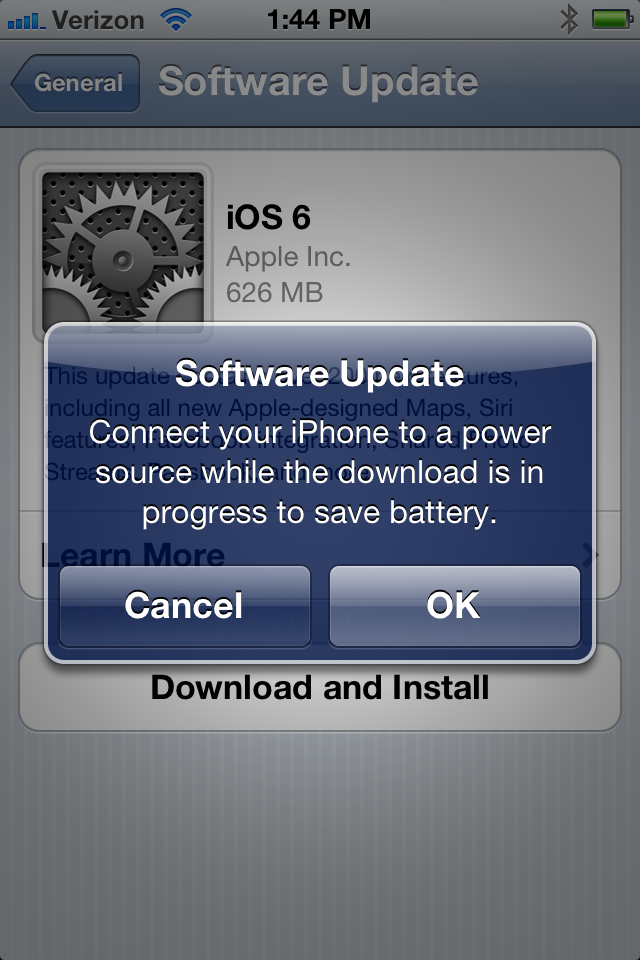
As I predicted at about 1pm I was able to download the new Iphone iOS this afternoon. After selecting "Settings", "General" and finally "Software Update" I was notified that iOS6 was indeed available.

Crossing my fingers I then selected "Download and Install".


I was glad to see that you are then reminded to plug your phone into a power source for the install, which I of course did.


The update process took about 60 minutes. Your best bet during this upgrade is just to walk away and leave your iPhone in peace so it can get the job done. Once the update has been completed you will be prompted for some information. Simply select the defaults and move forward. Afterward you will be back at your main screen. You will see an additional icon on the screen, "Passbook". I have no experience with this new app but I will explore it soon. You will also notice that the iTunes store has been given a facelift.


I am sure there will be plenty of app updates in the next several weeks as app developers hustle to catch up with iOS6. Make sure you update your iPhone and iPad today.... and good luck.

Tuesday, September 18, 2012

Apple's iOS6 Arrives

Tomorrow Apple releases the updated operating system iOS6 for the iPhone and iPad. This operating system is the backbone of the upcoming Iphone5 but is also available for the previous iPhone models and iPads starting tomorrow.

Here are some of the reported enhancements as I understand it at this time.

A New YouTube- If you enjoy YouTube be aware that YouTube is now longer a native part of the OS. This means you will need to download the YouTube app from the app store. Ironically from what I understand the new YouTube app is a big improvement from the native version.

Apple's New Maps- Getting around with your iPhone will be an experience by itself now, with spoken directions and turn-by-turn navigation, real-time crowdsourced traffic updates, Quick routes and re-routing options, Yelp-powered details on nearby businesses and more. One of the highlights of this feature would be Flyover, a 3D rendition of buildings and major landmarks for a close-up interactive 3D view of cities around the world.

A Smarter Siri- Siri is now savvy in sports stats, restaurant reviews and rotten tomatoes (imdb movie ratings). You can make reservations with Siri through the OpenTable app, and check out movie schedules and ratings. Have a lot of apps to sift through, look up and launch? Launch it the new way by asking Siri to launch the app for you. With the iOS6, you can even dictate your posts for release on Facebook and Twitter.

An Integrated Facebook- It’s easier than ever to share on Facebook with the new iOS6. Share photos and locations straight from your device and get your updates about what’s happening on Facebook in your contact and Calendar. Profile information will be integrated into Calendar so you won’t get to miss a thing, especially since you now get notifications for both Facebook and Twitter updates from the notification center.

Passbook App- Tickets, boarding passes, movie tickets and store cards are things of the pass. Scan in your details to get on that plane, into that cinema or that concert and keep constant tabs on your store card balance all from your iOS devices.

Improved FaceTime- Phone numbers and Apple IDs are unified in iOS 6 and FaceTime is now cellular, so if someone calls you via your phone number on FaceTime, you can answer on your iOS device or on your Mac. Messages sent to your iOS device also updates in real-time to your iPad and Mac.

Enhanced Phone App - Yes It Appears Apple Even Worked on on the Phone Itself- Never miss a call again. Reply to missed or declined calls with a canned message, or add a reminder to yourself to call back at a better time. There is also a ‘Do Not Disturb’ mode that can be scheduled to let you regain some of your sleep time.

How To Get iOS6?

You can upgrade your devices "over the air" which means you do not need to plug your device into your PC. However be sure to back up your device in Itunes beforehand and make sure your battery is fully charged.

To get it go to "Settings", "General" and choose "Software Update". The update should be available about mid-day (EST) on Wednesday, September 19, 2012. Good Luck.

Thursday, January 20, 2011

Apple Users Beware


During December's Security Training I was asked why "Apple products" don't get viruses. I noted that one of the primary reasons was simply that the market share of Apple vs. PC was very small in comparison and hackers usually choose to spend their programming time on the biggest audience possible. Hackers want the biggest bang for all of their hard and evil work. The below article which appeared recently at Spamnews.com covers the growing threat to Apple products in general. The morale of this story is use common sense and protect your information, regardless if you are a PC user or an Apple user.

According to McAfee the security vendor, which recently released a research study, Mac OS is in more danger of Apple Trojans and botnets because users tend to have low knowledge of how to keep new Apple tools secured, which leads them into the danger of identity theft. Current.com published this on January 10, 2011.

Moreover, there are other threats to Mac OS, according to the security company like botnets' rising operations, increasing hacktivism, and growing networks of online television that can cause businesses to lose secret data in case they're targeted.

In its security alert, Michael Sentonas, Chief Technology Officer for Asia Pacific states that while Mac users earlier were immune from hackers' assaults, they're currently being increasingly targeted through Apple products. Smartcompany published this on January 11, 2011.

Sentonas further states that it's being observed that both business and home users are increasingly using the Mac operating system and with the OS' growing market share, it's quite expected that distributors of malicious programs will begin considering focusing their attacks on this platform. The CTO cautions that Mac users can't just take for granted that they'll be safe from attacks, hence they must embrace anti-virus applications while maintaining it up-to-date.

Additionally he states that his company on average is spotting some 60,000 fresh malware items daily. And with this amount being huge, there's greater requirement of user awareness about this problem.

Moreover, McAfee further cautions that security risk is growing during 2011 since every minute about 3,000 shortened URLs are created. The company in its 2011 Threat Predictions Report forecasts that there'll be more danger with URL-condensing utilities on social-networking websites. Also it forecasts that hackers on social-networking websites will increasingly concentrate on geo-location utilities like Gowalla, Foursquare as well as Facebook Places, which trace users' whereabouts and also publish them.

Eventually, McAfee notes that still other threats such as viruses from personal contacts, or malware camouflaged as genuine files and e-mails will all become more advanced thereby effectively deceive unsuspecting users during 2011. Besides, botnets will keep on using unlimited stolen bandwidth along with computing power across the world, the company adds.