Wednesday, September 19, 2012

My iOS6 Update

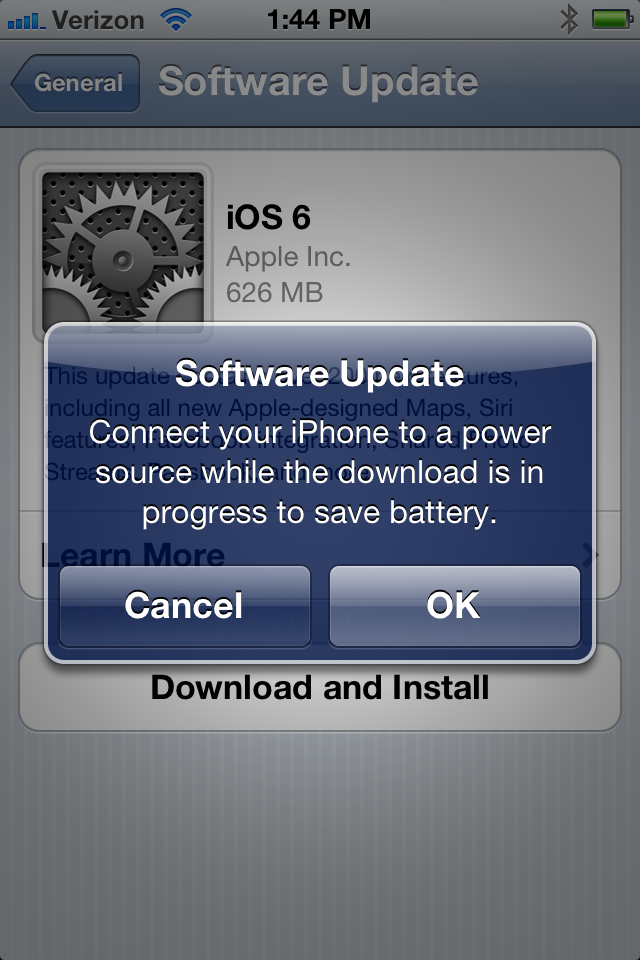
As I predicted at about 1pm I was able to download the new Iphone iOS this afternoon. After selecting "Settings", "General" and finally "Software Update" I was notified that iOS6 was indeed available.

Crossing my fingers I then selected "Download and Install".


I was glad to see that you are then reminded to plug your phone into a power source for the install, which I of course did.


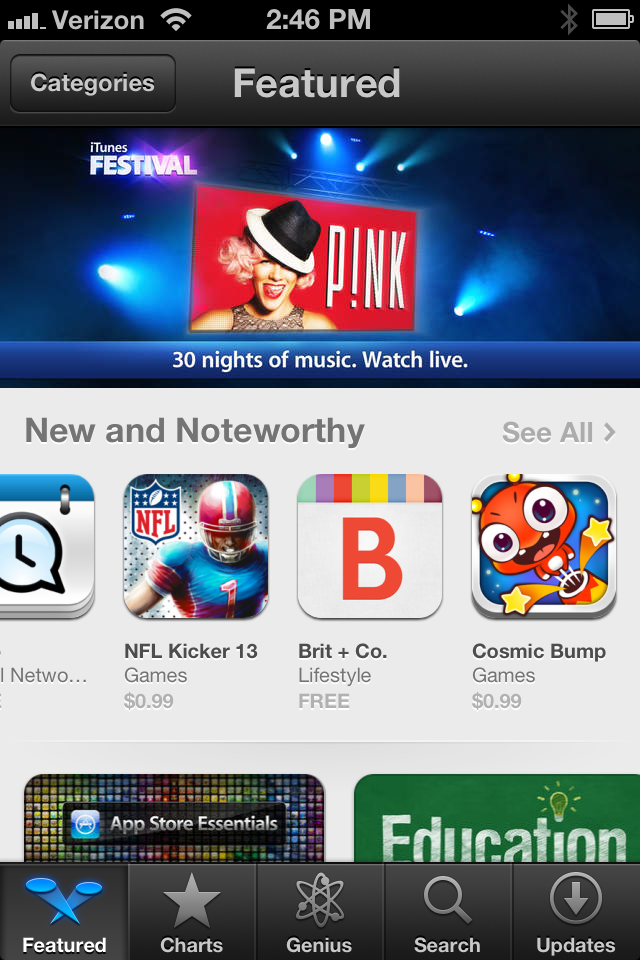
The update process took about 60 minutes. Your best bet during this upgrade is just to walk away and leave your iPhone in peace so it can get the job done. Once the update has been completed you will be prompted for some information. Simply select the defaults and move forward. Afterward you will be back at your main screen. You will see an additional icon on the screen, "Passbook". I have no experience with this new app but I will explore it soon. You will also notice that the iTunes store has been given a facelift.


I am sure there will be plenty of app updates in the next several weeks as app developers hustle to catch up with iOS6. Make sure you update your iPhone and iPad today.... and good luck.

Tuesday, September 18, 2012

Apple's iOS6 Arrives

Tomorrow Apple releases the updated operating system iOS6 for the iPhone and iPad. This operating system is the backbone of the upcoming Iphone5 but is also available for the previous iPhone models and iPads starting tomorrow.

Here are some of the reported enhancements as I understand it at this time.

A New YouTube- If you enjoy YouTube be aware that YouTube is now longer a native part of the OS. This means you will need to download the YouTube app from the app store. Ironically from what I understand the new YouTube app is a big improvement from the native version.

Apple's New Maps- Getting around with your iPhone will be an experience by itself now, with spoken directions and turn-by-turn navigation, real-time crowdsourced traffic updates, Quick routes and re-routing options, Yelp-powered details on nearby businesses and more. One of the highlights of this feature would be Flyover, a 3D rendition of buildings and major landmarks for a close-up interactive 3D view of cities around the world.

A Smarter Siri- Siri is now savvy in sports stats, restaurant reviews and rotten tomatoes (imdb movie ratings). You can make reservations with Siri through the OpenTable app, and check out movie schedules and ratings. Have a lot of apps to sift through, look up and launch? Launch it the new way by asking Siri to launch the app for you. With the iOS6, you can even dictate your posts for release on Facebook and Twitter.

An Integrated Facebook- It’s easier than ever to share on Facebook with the new iOS6. Share photos and locations straight from your device and get your updates about what’s happening on Facebook in your contact and Calendar. Profile information will be integrated into Calendar so you won’t get to miss a thing, especially since you now get notifications for both Facebook and Twitter updates from the notification center.

Passbook App- Tickets, boarding passes, movie tickets and store cards are things of the pass. Scan in your details to get on that plane, into that cinema or that concert and keep constant tabs on your store card balance all from your iOS devices.

Improved FaceTime- Phone numbers and Apple IDs are unified in iOS 6 and FaceTime is now cellular, so if someone calls you via your phone number on FaceTime, you can answer on your iOS device or on your Mac. Messages sent to your iOS device also updates in real-time to your iPad and Mac.

Enhanced Phone App - Yes It Appears Apple Even Worked on on the Phone Itself- Never miss a call again. Reply to missed or declined calls with a canned message, or add a reminder to yourself to call back at a better time. There is also a ‘Do Not Disturb’ mode that can be scheduled to let you regain some of your sleep time.

How To Get iOS6?

You can upgrade your devices "over the air" which means you do not need to plug your device into your PC. However be sure to back up your device in Itunes beforehand and make sure your battery is fully charged.

To get it go to "Settings", "General" and choose "Software Update". The update should be available about mid-day (EST) on Wednesday, September 19, 2012. Good Luck.

Office 2013 Update

Just by reading some of my recent posts you know it's no secret that Microsoft is prepping up for its October event where it will be announcing its latest operating system, Windows 8. The OS will also be accompanied by the release of Microsoft's first Windows RT-based tablet, Surface.

The latest announcement from Microsoft is that Office 13 will be ready to ship to Windows RT (tablet) users by November. A blogpost form the Office Team mentions that Windows RT will contain a preview , that is beta versions of Word, Excel, PowerPoint and OneNote for Office 2013. I have been using this for a few months now and so far I really like what I have seen.

The post also states that updates to the final version will roll out via Windows Update in early November, which will continue through January.

A release date for the PC version of Office has not et been announced, although an early 2013 is a safe bet.

The Office Team explained that there will be some feature differences in between the RT (table) and PC versions. I am hoping for the best here as having differences between the two will surely confuse some users. For example Microsoft has already stated that Office on Windows RT (tablets) will not include macro support or any additions that rely on ActiveX controls, such as embedded Flash.

You can also say goodbye to old PowerPoint files since they won't work at all. This could be a hurdle but I am sure there will be some sort of "workaround". PowerPoint won't support recording narrations. Excel will also lose some of its data handling capabilities. Microsoft also said that certain email features will not be supported as Windows RT (tablet) does not have support for an Office RT (tablet) version of Outlook.

Microsoft says its Office 2013 RT (tablet) edition has been designed for touch support and longer battery life. "Office applications are enabled for "touch mode" by default, so the touch experience is better out of the box," the blog said.

All of this aside I must say I am really excited to finally have Microsoft Office available on a tablet device. For those of us on the go access to these documents will make working on the road easier then ever.

Microsoft will publish a specific update schedule on its blog on October 26.

Microsoft Warns of a New IE Security Threat

Microsoft has urged Windows users to install a free security software to protect their PCs from a newly discovered vulnerability in its Internet Explorer browser.

Microsoft said it will advise customers on its Web site to install the software as an interim measure, buying some time for it to fix the bug and release a new, more secure version of Internet Explorer, Reuters reported on Monday.

The free security tool, called the Enhanced Mitigation Experience Toolkit (EMET), will prevent hackers from gaining access to Windows-based systems and is currently available on Microsoft Web site.

This comes after security researcher Eric Romang discovered a new zero-day vulnerability in Internet Explorer, which he claimed woud affect fully patched versions of Microsoft Internet Explorer 7, 8 and 9.

Please be aware. This is for Internet Explorer, not Chrome, Firefox or Safari. However even if you do not use Internet Explorer regularly you should take the time to install this free security software. I ran the application this morning and it took less then 3 minutes and no re-boot was required.

Friday, September 14, 2012

RIP RIM

With the release of Apple's Iphone 5 I foundly remember the once dominate Blackberry.

Research in Motion (RIM) at one point was the leader in the smartphone world. From the mid 2000's through 2010 Blackberry phones were seen as upscale and necessary devices. This was especially true for the professional on the move. However I believe it was this tight relationship with that "professional" that began to stagnate inovation with the Blackberry itself. You could see this with their limited development of apps (applications).

What RIM lost sight of in my opnion was that most people expect their smartphone to be "all things for all occasions". This simply means that the smartphone today needs to keep you connected to work with the ability to easily access files as well as keeping you in constant contact with your co-workers and clients. Now this is where RIM dropped the ball and continues to fumble. Most users of smartphones only carry one, both for work and personal use. The world we live in today is connected and fast. Because of this smartphone users also expect access to services like Facebook, Twitter, YouTube as well as countless other consumer services. Consumers expect all of these services to be available at the same time, on the same device. I am not sure that RIM every truly understood the importance of this.

Today as Apple and Android battle it out for dominace in mobile technology (smartphones and tablets) RIM as been forced to the sideline. I believe RIM only recently realized that they were in serious trouble. In an effort to remain relevent RIM released their own tablet, "The Blackberry Playbook" in 2010. This device failed to make a dent in IPAD or even Android tablet sales. Once again RIM missed the boat on current technology trends. The "Blackberry Playbook" had limited apps available and proved basicly to be a larger version of the Blackberry smartphone.

The largest customer base for RIM at this time is state and federal government. Government is usually taking up the rear in technology trends but even this last customer base is beginning to erode. As Apple and Android continue to challenge each other with innovating new mobile technologies this last customer base will continue to drindle. When that happens, probably within the next year, RIM will probably finally rest in peace.

Next Technology Training Date Set

Our next technology training date has been scheduled for Thursday, October 25, 2012. As always there will be 2 sessions (10AM or 1PM). Plese send me any training ideas or topics you would like covered.

Outlook Tip - Print Only One Page of an Outlook Message

Other Office apps let you print the current page (or one or more numbered pages) directly from the Print menu in Backstage view by clicking the down arrow next to the Print All Pages button to see the page-range options. Outlook doesn't offer those options on its Print menu; instead, you must click the tiny Print Options button on the Print menu, then select a Page Range option.

Thursday, September 13, 2012

IGoogle Going Away

The internet is a very big digital universe. Finding a start page that works for us can be very difficult. For the past couple of years I have used iGoogle. This start page offers everything you could want as a starting point on the internet. Tabs where you can separate your interests, great widgets, awesome customization options and a great way to organize your internet links. This start page also looks great on mobile devices. Anyway all good things really do end. This is proven once again because apparently iGoogle is going away on November 1, 2013. I know this because it is being announced on the webpage. See below image.


There are not really that many good options for internet start pages, which has always surprised me. Sure there is Yahoo and MSN. However these are "out of the box" designed and I was never satisfied with the limited ability to design or personalize these particular start pages.

The good news here is Google has given us plenty of warning. I will be researching start pages over the next month or so and looking for good options. Watch for my report.

What start page do you use? Let me know maybe you can come to my rescue!

Wednesday, September 12, 2012

Word Tip - Customize the Ribbon

Microsoft Office finally lets you rearrange the Ribbon the way you want by clicking the File tab to go to Backstage, selecting Options, and then Customize Ribbon.

This is the Ribbon in all Microsoft Office Products.

Once "backstage", in the right-hand column, you can create a new tab or a new group on an existing tab, remove or rearrange items already on the Ribbon by selecting them in the right-hand column, or select items that you want to add from the list on the left. Long-term Office users may want to use the "Commands not on the ribbon," function because you can now add a command that you used in older versions of Word that nixed from the Ribbon due to lack of demand.


Note: A button on the lower right lets you export your customizations to other Office setups.

Friday, September 7, 2012

Star Trek Gets Some Google Love

Star Trek has now been around for 46+ years! It almost as old as me. Star Trek is more popular now then it was back when it originally aired. Through 5 TV series, 11 movies and even an animated series Trek really will never die. If you love Star Trek or even if you don't check out Google's "Star Trek Doodle" which will apparently be live at www.google.com through tomorrow evening. You can click around and even re-live one of Kirk's greatest battles.


I very special thank-you to dedicated readers Gerry DiNunzio and Lisa Glass for taking the time to "red alert" me on this one. I was so busy today I probably would have missed out on this very special Star Trek adventure.

Thursday, September 6, 2012

Tip of the Day - Word 2010

Open Recently-used Files With Two Keystrokes

In older versions of Office, the File menu always displayed your recently-used documents, which you could open by typing Alt-F1, then the number of the document on the list (1 for the most recent, 2 for next most recent, etc.). This feature isn’t turned on by default in Office 2010, but you can activate it by entering the Backstage view, selecting Recent, and adding a checkbox next to "Quickly access this number of recent documents." Change the number to whatever number of documents you want to see on the list. In the Recent Documents list, you can "pin" a document to the list so that it will always appear, even if you haven't opened it recently. A nifty new feature lets you "pin" entire folders to the list of Recent Places in the right-hand column on the menu.

Monday, September 3, 2012

Khan Academy

While watching 60 Minutes on Sunday evening, September 2, 2012 I was introduced to “Khan Academy”. I know what you are thinking and you are wrong. This is not the same Khan who terrorized Captain Kirk and crew in Star Trek II. While watching this I was introduced to Salman Khan who in 2006 created this online education resource that grabbed the attention of Bill Gates, founder of Microsoft. As with any great innovation this one was stumbled on by an “out-of-the-box” thinker for a very specific purpose.

Salman Kahn has earned three degrees from the Massachusetts Institute of Technology (a BS in mathematics, a BS in electrical engineering and computer science, and an MS in electrical engineering and computer science). In 2004 Khan wanted to help his cousin Nadia (remotely) in mathematics. Kahn decided to do this using Yahoo!’s Doodle notepad. When friends and relatives watched these innovative short tutorials they were amazed by the easy going educational content of Kahn's published videos on YouTube. The popularity grew so quickly that Khan quit his job and concentrated on building “Kahn Academy”, a non-profit education resource available to anyone wanting to learn. “Kahn Academy” has grown so popular and accepted that besides catching the attention of Bill Gates, school districts in California have begun using this great resource in class.

“Kahn Academy” has grown to include topics beyond mathematics, such as “history”, “astronomy” and “economics”. This type of educational web resource could turn education on its head, especially for children and young adults. It is hoped that “Kahn Academy” can begin tackling higher education as well.

If you have children in school I recommend you check it out. Signing up is free and your education or your child’s educational experience can be greatly and positively impacted by this. I really wish this amazing resource was available when my boys were going through school. If you have children in school take a few moments to check "Kahn Academy" out. It could change their lives.

Learn more at the 60 Minutes website.
Check out Kahn Academy today.
Check out Salman Kahn on TedTalks (below).

Sunday, September 2, 2012

Yet Another Rogue AV Application

Yet another fake antivirus/antimalware tool started making people’s lives miserable as August 2012 came to an end. The “Windows 8 Security System” claims to detect infections, and displays alerts to scare users into purchasing protection. The real infection, of course, is the “Windows 8 Security System” itself.

I have been asked to "clean" two computers during the past 2 weeks with this very infection and I can say it is very difficult to remove.

It appears that the evil developers of rogue antivirus software are playing up the connection to Windows 8, which Microsoft plans to release at the end of October. “Windows 8 Security System” is very similar to other fake AV products. All of these fake AV products extremely aggressive and hard to remove. In the case of this new one a victim’s system gets infected with “Windows 8 Security System” after visiting an infected website. Sadly it is easy to fall victim to rogue software like the new “Windows 8 Security System”, which extort money from PC owners to “fix” their systems. McAfee Labs recommends disabling Java in your browsers and running your antimalware software with real-time protection enabled. You should also be careful with downloading files from torrents or clicking on email and chat links.

“Windows 8 Security System” will display countless fake alerts and messages and will show a scan window on each system boot. It will display lots of detections, though it is obvious these are fake.


All of these rogue malware applications make sure that your system is compromised and that you cannot easily detect and remove the infection.

“Windows 8 Security System” alerts at the taskbar look like this:


What to do? Sometimes restoring your PC to an earlier date works, sometimes it does not. You can also try booting into safe mode (with networking) and running your real AV application. If you do this make sure to choose to scan your entire PC, not just the system files. If this still does not help additional security services like SpyBot may help. Of course if all of this does not work, backing up your personal files and completing a reformat will remove the virus. The point here is that all of these tasks will either cost you a lot of time or money. The best defense is to avoid these malicious applications by avoiding questionable websites, including torrent sites and of course never ever clicking on attachments in email if you did not specially request the file.

Friday, August 31, 2012

Backup The Right Way

On August 10 I wrote an article about how relying exclusively on cloud drive services such as Dropbox and Skydrive for backing up your files can be dangerous. This is because if a file becomes corrupted it will replicate to all of your physical locations where the cloud drive service is installed as well as the cloud itself.

Good old fashion backups are still necessary and should be taken seriously. One of the best ways to remember how to back up your images safely is to use the 3-2-1 rule.

I recommend storing 3 copies of any important file (a primary and two backups).

I recommend having the files on 2 different media types (such as an external hard drive and USB media), to protect against different types of problems. You can accomplish this simply by backing your files up to 2 separate external drives.

1 copy should be stored offsite (or at least offline). There are many free services so there is no excuse. I have written articles and discussed many of these free services in our training classes.

In a future article I will discuss some examples of the reasons you need to back-up such as viruses, device failure, theft and disasters.